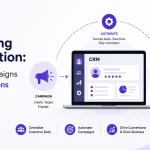
Imagine it’s Tuesday, 4:47 PM, and your sales rep just closed a deal. That’s good news. Now fast-forward nine days. The inventory team has not received the final details, the delivery schedule remains unconfirmed, and the customer has started asking for updates. The problem is not a lack of effort; it is a lack of visibility into what happens after the sale. Now, it’s time for Reducing Order Delays with CRM-Based Sales Pipeline Tracking.
Every confirmed deal should move the business forward, not leave teams chasing updates, searching through email threads and figuring out what they need to do next. With the help of a CRM based pipeline, you can easily give your team a clear view of deal progress, pending tasks, ownership and the next steps required to move an order forward.
So, in this blog, we’ll explore how WHSuites CRM can help businesses improve pipeline visibility, strengthen team coordination and reduce avoidable order delays.
What Exactly is CRM-Based Sales Pipeline Tracking?
CRM-Based sales pipeline tracking is basically a process of monitoring sales opportunities through defined stages using Customer Relationship Management Software. This software helps businesses see where each deal stands and who is responsible for the next step.
A standard sales pipeline may include these stages:
Lead Received
Lead Qualified
Customer Requirements Discussed
Quotation or Proposal Sent
Negotiation in Progress
Deal Closed
Order Processing
Order Dispatched
Order Delivered
These stages can be changed as it depends on the business.
Why Do Order Delays Happen After a Deal Is Closed?
Getting an order is important, but handling it matters the most. Without systematic software, order delays happen. Let’s have a look at some major reasons:
Incomplete Order Details
Poor Communication Between Departments
Missed Follow-Ups & Pending Approvals
Limited Visibility Into Order Status
Manual Data Entry & Repeated Work
How CRM-Based Sales Pipeline Tracking Helps Reduce Order Delays
With a well-structured CRM workflow, your business can move beyond simply recording deals. It makes all the pending activities visible, establishes accountability and helps teams address problems before they affect delivery commitments:
Create a Clear Order Processing Workflow
After order confirmation, multiple steps need to follow, like verifying details, confirming payment, checking inventory and preparing the order. Unclear steps can lead to confusion. With the help of a structured CRM, employees can easily organize all these activities into clear and well-defined stages, so that your team knows exactly where each order stands.
Automates Routine Follow-Ups
Your team never remembers all the pending approvals, especially when your business deals with huge data. This is where a well-designed CRM workflow automation works by creating tasks, sending reminders and notifying the responsible employee when action is required. Also, with this, you can reduce the chances of missed follow-ups and help your team deal with pending tasks.
Assign Clear Ownership to Every Task
Have you ever seen an order remain pending simply because each department thought someone else was handling it? This often happens. A CRM helps you by making all the responsibilities clearer by assigning tasks to specific employees and tracking their progress. Sales can now manage customer requirements, finance can verify payment details, and operations can prepare the order for fulfillment.
Identifies Bottlenecks Before They Become Bigger Problems
An order that stays in the same stage for too long may indicate an underlying problem. It could be waiting for approval, missing essential information or facing an inventory issue. With a proper CRM dashboard and pipeline reports, you can easily identify where orders are slowing down. Early spotting of errors also helps the team address the actual cause of the delay.
Improves the Handoff Between Sales & Operations
The sales team knows what customers have agreed to, but the operations team needs accurate order details to fulfil those commitments. With the help of a systematic CRM, you can easily get a shared place to record customer requirements, order details, agreed pricing, delivery instructions and relevant updates. This allows the operations team to access the information it needs without repeatedly contacting sales for clarification.
Keeps Customer Communication Consistent
Customers always want to know what is happening with their orders, especially when delivery takes longer than expected. With CRM-based sales pipeline tracking, your team can refer to shared records and the latest available updates before responding to customers. Employees can easily review previous conversations, check pending activities and communicate the next step more clearly.
A Real-Life Example: How CRM Tracking Can Prevent Order Delays
Consider a wholesale distribution company that receives a confirmed order from a retail customer.
They don’t have any structured workflow. What happens next? The sales representative may email the order details to operations. Finance separately verifies the payment, and the warehouse is still waiting for confirmation before preparing the goods.
One message overlooked can cause the order to remain pending.
Now consider the same process with CRM-based sales pipeline tracking:
Step1: The Customer Confirms the Order
Step 2: The Next Actions are Assigned
Step 3: The Team Completes the Required Checks
Step 4: Pending Tasks Become Visible
Step 5: Operations Receives the Handoff
Step 6: The Customer Receives a Reliable Update
Steps to Implement CRM-Based Sales Pipeline Tracking in Your Business
Adopting CRM software is only the first step. Businesses also need a well-defined process that employees can follow consistently:
Map Your Existing Order Process
Define Clear Pipeline Stages
Assign Owners and Deadlines
Automate Repetitive Activities
Connect the CRM With Other Business Systems
Build Useful Dashboards
Train Employees & Review the Process
Key Features of WHSuites CRM That Support Fast Order Processing
Now, the question is: why should you invest in WHSuites CRM for fast order processing? Let’s see:
Sales Pipeline Management
Task & Follow-Up Management
Centralized Customer Information
Clear Task Ownership
Workflow Automation and Notifications
Sales Reports & Pipeline Visibility
Integration With Business System
Frequently Asked Questions about Reducing Order Delays with CRM-Based Sales Pipeline Tracking
Question. Which type of metrics should businesses track to measure order processing efficiency?
Answer: Businesses should track average order processing time, time from deal closure to fulfillment, overdue tasks, order error rates and on-time delivery rates. By monitoring all these metrics, you can easily identify delays, evaluate team performance and measure improvements after implementing CRM based sales pipeline tracking.
Question. Can a CRM also track orders after a deal is closed?
Answer: Yes, a CRM can also track post-sale activities when the relevant stages and workflows are configured. Teams can easily monitor pending customer confirmations, documentation, approvals and handoffs to fulfillment.
Question. How can businesses identify bottlenecks using CRM reports?
Answer: Businesses can easily review overdue tasks, pipeline stage duration, pending approvals and follow-up completion rates through available CRM reports.
Question. Does CRM automation eliminate order delays completely?
Answer: No, CRM automation cannot eliminate every order delay. It can reduce delays caused by missed follow-ups, repetitive manual tasks and overlooked reminders. However, issues such as stock shortages and payment issues can still cause delays, disputes, and shipping problems may still affect fulfillment.
Question. How can businesses manage high order volumes using a CRM?
Answer: Businesses can easily manage high order volume by organizing deals and order-related activities by status, assigning tasks to responsible employees, prioritizing urgent requests and automating routine reminders where available.
Question. Is CRM tracking suitable for small businesses?
Answer: Yes, CRM tracking is also suitable for small businesses that want to organize customer enquiries, monitor sales progress, manage follow-ups and reduce manual coordination.