
If you run a sales team, chances are you started with spreadsheets. They are familiar, free and flexible. But at some point, the cracks start to show — missed follow ups, duplicate entries, no visibility into the pipeline and hours lost in manual updates. The question every growing business faces is, should you continue managing sales with a spreadsheet or is it time to move to a dedicated CRM platform? In this blog, WHSuites will provide you with everything you need to know about the real differences between a spreadsheet and a modern CRM system, backed by data so you can make the right decision for your sales team.
What Is a Spreadsheet CRM?
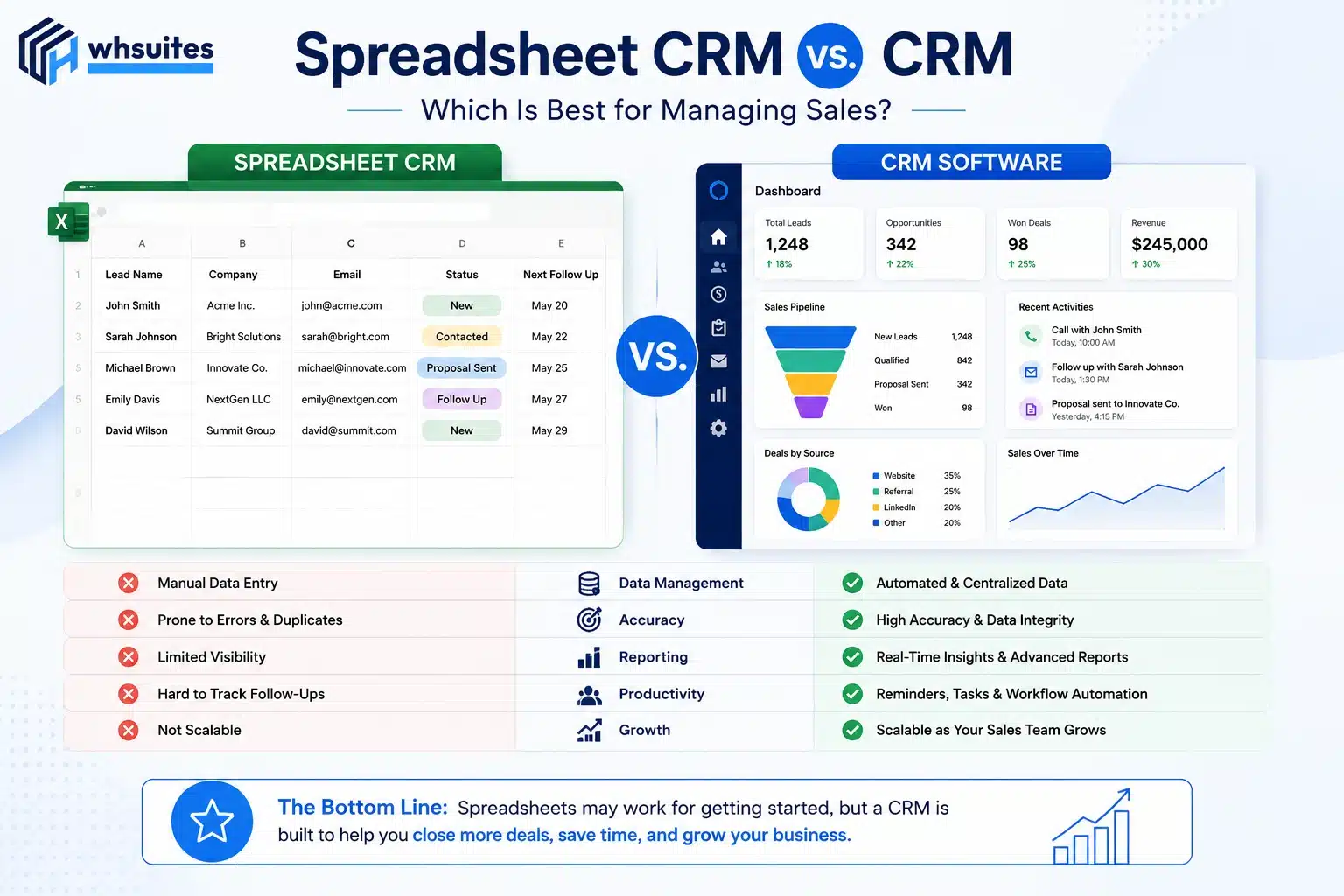
A spreadsheet-based CRM refers to an Excel or Google Sheets document designed to manage contacts, businesses, leads, deal stages, follow-ups, etc. While this method of managing customer relationships is not a true CRM solution, it is a valid workaround to provide a measure of tracking and reporting for many startups.
Here are some common tasks for which many people use spreadsheet CRMs:
- Storing and tracking prospective customer names, phone numbers, and email addresses
- Manually recording notes from phone calls and meetings
- Colour-coding deal stages by various attributes
- Linking reminders via external calendar applications
This application of a spreadsheet-style CRM may work well when your business is small, but it cannot accommodate many of your businesses CRM needs as your business grows.
What Is a CRM System?
A CRM (Customer Relationship Management) system is purpose-built software developed to manage all customer interactions, automate the sales process, track leads through their pipeline, and provide real-time reporting — all from one centralised location (or dashboard).
WHSuites is one of the newest CRMs developed and it provides support for managing more than just contacts. WHSuites helps manage your sales process by allowing you to:
- Automatically collect and assign leads from multiple lead sources
- Track and document each time there is an interaction (call, email, meeting, follow-up) with a prospect/customer
- Show you the entire sales pipeline with all of the deal stages included
- Set automatic reminders and tasks using job triggers
- Provide you with performance reports without having to perform manual data entry/collection
The Numbers Tell the Story
Before discussing results, here are statistics related to CRM adoption and the effect that CRM adoption has had on businesses:
- 29% – Companies with a CRM system have reported an average increase of 29% in revenue since the implementation of their CRM (Salesforce).
- 34% – CRM users reported an average 34% increase in productivity from sales.
- 42% – Sales team members that use CRM systems improve their accuracy of sales forecasts from those that do not use a CRM system (Salesforce).
- 40% – In 2024, an estimated 40% of salespeople store their customer data in a less than formal way using spreadsheets and/or electronic mail (HubSpot, 2024).
- 44% – Gain.io in 2024 reported that 44% of all companies have had at least one spreadsheet error in each of the last 12 months, which resulted in lost opportunities for those companies.
- $8.71 – On average, each company will receive an average of $8.71 back for every $1 that was spent building and implementing its CRM system (Nucleus Research).
Spreadsheet CRM vs. CRM: Head-to-Head Comparison
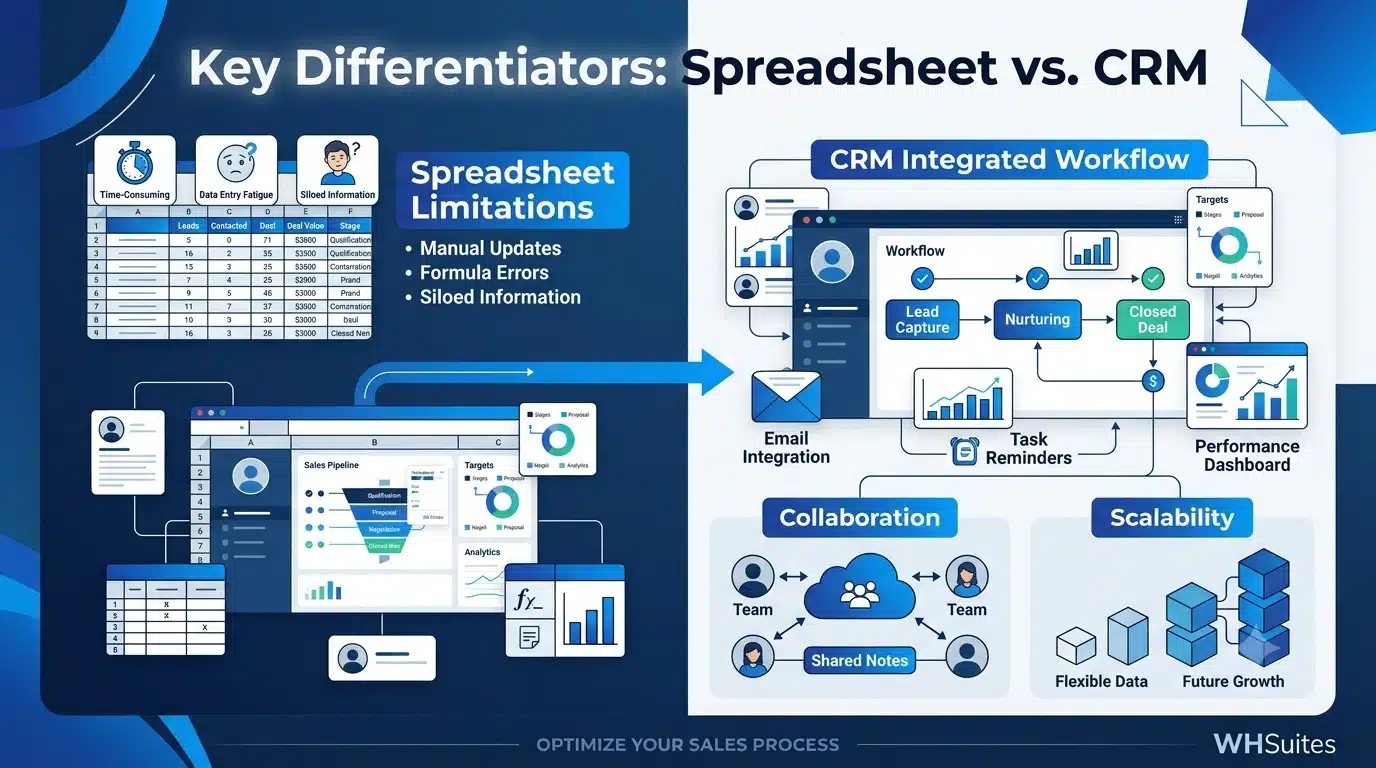
Let us look at the key areas where both tools stack up against each other:
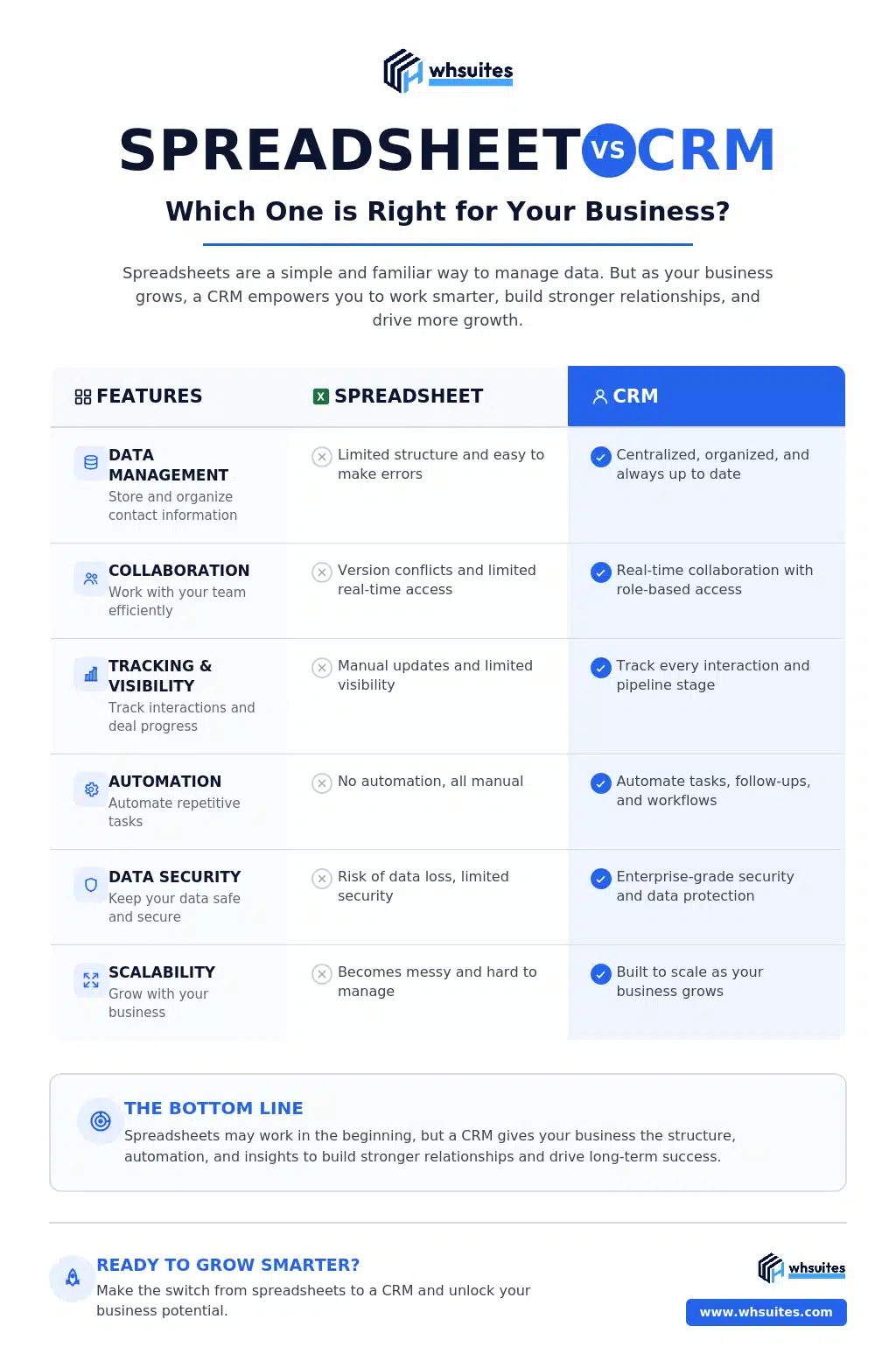
| Feature | Spreadsheet | Dedicated CRM (WHSuites) |
| Lead Capture | Manual entry only | Automatic from multiple sources |
| Pipeline Visibility | Custom-built, static | Real-time visual pipeline |
| Follow-up Reminders | External calendar needed | Built-in automated reminders |
| Collaboration | Version conflicts, no real-time sync | Live team access with role control |
| Reporting & Analytics | Manual charts, no live data | Real-time dashboards and reports |
| Automation | None | Lead assignment, follow-ups, emails |
| Scalability | Breaks down beyond 100-200 contacts | Scales to thousands of contacts |
| Data Security | No access control, easily shared | Role-based permissions and audit logs |
| Mobile Access | Limited | Full mobile app access |
| Integration | None or manual | Email, WhatsApp, portals, and more |
| Cost (Hidden) | Low upfront, high in lost time | Subscription with clear ROI |
Where Spreadsheets Fall Short for Sales Teams
1. Manual Data Entry Kills Productivity
According to a survey conducted in 2024, sales reps are wasting an average of 1 hour daily doing manual data entry. This equates to 1 hour of wasted time daily, 5 hours of wasted time per week and 20 hours of wasted time per month, when they are entering data into a spreadsheet instead of engaging with their prospects. A CRM system will automate these processes by logging sales activities and updating a salesperson’s customer records without the need for any manual entry.
2. No Real Pipeline Visibility
A spreadsheet gives you a list of potential sales; it doesn’t show you a visual pipeline of those potential sales and doesn’t provide any idea of how many deals are currently being negotiated or whether any of your potential customers are going cold, so you can’t tell what you expect your revenue to be this month. In contrast, with a CRM, you have a living, breathing visual representation of your pipeline with deal stages, probabilities and value all being dynamically updated.
3. Version Control and Data Errors
When several people are updating a shared spreadsheet, it can result in chaos. A 2024 study by XYZ found that 44% of companies had spreadsheet errors every month; errors can come in the form of duplicate records, deleted records, or missing records — all of which negatively affect the ability for an organization to perform well in terms of sales and customer relationships.
4. Zero Automation
Spreadsheets cannot automatically send emails to your leads when they become stale. Spreadsheets cannot automatically assign new leads to the appropriate sales representative based on territory or which products they are responsible for. They cannot generate alerts to your manager that a deal has been stagnant for longer than seven days. A CRM can automate these tasks and much more.
5. No Collaboration at Scale
As your organization grows in size, shared spreadsheets limit your ability to collaborate effectively. Your ability to work together in real-time is an issue, there is very little in way of access controls, and there won’t be an audit trail for what changes have been made to the shared spreadsheet. CRMs allow you to give access based on teams, to view notes made by other stakeholders, and create clear accountability of whom is responsible for maintaining a lead.
When Does a Spreadsheet Still Make Sense?
It is fair to say that spreadsheets can have their place in business management, but the following scenarios demonstrate when they can work as an effective tool:
- You are a solo operator or independent contractor and have fewer than fifty contacts active at any given time.
- There is only a very simple one-step process for your sales activities.
- There is no need for team collaboration or automated activity.
- You are just starting up your business and have little or no lead activity yet.
By general consensus from the majority of industry experts, once your company has more than ten employees, or you are actively managing between one hundred and two hundred leads at any given time, then a spreadsheet has transitioned from being an asset and now has become a liability.
Signs You Have Outgrown Your Spreadsheet CRM
You probably have outgrown the spreadsheet you have been using as your CRM if you can identify two or more of these as occurring in your business:
- You frequently miss follow-up appointments by your team members or salespeople.
- You cannot determine where prospects are at in the sales cycle without contacting their sales representative directly.
- Different members of the sales staff are working off of different versions of the same document.
- You have leads that did not receive reminders regarding the follow-up appointment resulting in them slipping through the cracks.
- You take hours of manual effort to create reports from your sale history.
- You do not have a single location where you can store new leads generated from all of the various sources they were generated from.
- Your supervisor does not have visibility into daily activity of all salespeople working in the business at any given time.
If you have two or more of these indicators occurring, then it is time for you to upgrade your current system.
Why WHSuites CRM Is the Right Switch
WHSuites is a specialized sales CRM designed specifically for businesses in India and sales teams that are expanding. It provides all of the tools needed by your team to effectively manage leads, close business, and grow revenue without having to deal with the difficulty of using spreadsheets.
Automatically Capture Leads: WHSuites automatically captures all of your leads coming from multiple sources (such as websites, portals, WhatsApp and email) and assigns them instantly to the correct sales representative so that there will never be a need for manual data entry and there will be no missed leads.
Sales Pipeline That Visualizes Your Sales Activity: View all of your sales activity in real time. Move your deals from one stage to another with just one click, or receive alerts if one of your deals need your attention.
Smart Follow-Up Reminders: WHSuites reminds your representatives to follow up with their leads and keeps track of every lead’s interactions, eliminating any chance of missing the follow-up.
Team Collaboration: All team members will work with the same information. Sales managers will have 100% visibility to all of their sales representatives. Each representative will see only the leads assigned to them and all team members will be in sync with one another.
Real-Time Reporting: Retrieve immediate access to reports that show lead sources, team performance, deal values and conversion rates without having to spend significant time generating charts in a spreadsheet.
Industry Specific CRM Features: WHSuites is designed for a wide range of businesses from the pharmaceutical industry, real estate, solar energy, the education, insurance and information technology industries. Each industry has specific features to fit their individual sales processes.
Ready to Ditch the Spreadsheet?
Join hundreds of sales teams who have switched to WHSuites CRM and are closing more deals with less manual work. To book a free demo, visit the WHSuites website today!
Frequently Asked Questions About Spreadsheet CRM vs CRM
Q1. Can a spreadsheet work as a CRM?
A spreadsheet could perform some basic functions similar to a small company’s customer relationship management (CRM) system; however, due to the lack of features such as automation, real-time collaboration, pipeline visibility and scalability, using an actual CRM system is a much better option for serious sales teams.
Q2. Is it expensive to switch from spreadsheets to CRM?
CRM software products like WHSuites are extremely cost effective and designed specifically for Indian businesses. A clear return on your investment is evident as the average return is Rs. 8.71 on every Re. 1 invested. Also, most companies can recover their initial investment in 12 months or less.
Q3. How long does it take to migrate data from a spreadsheet to a CRM?
With WHSuites, migrating your data is a very simple and straightforward process. Our team will support you throughout the entire process, ensuring that no data is lost, simply follow the instructions for importing contacts and leads from your spreadsheet.
Q4. Will my team find CRM difficult to use?
WHSuites is very user-friendly and is designed for users that are not technically savvy. Most users can get started within a day and receive comprehensive training by our team.
Q5. What is the difference between a spreadsheet CRM and a real CRM?
Unlike a dedicated CRM system, which includes automation, visual representation of your deal pipeline, and integration capabilities, a spreadsheet-based CRM is essentially a manual file. WHSuites is an example of a dedicated CRM application that offers automated lead activity management, tracking for your deal’s stages, automated reminders, and real-time reporting – all on one platform.
Conclusion
To summarize, spreadsheets may work temporarily in your sales operations; however, as your company grows, the manual processes, errors in the data, and lost opportunities resulting from those processes become significant profit losses for your business.
With WHSuites, your sales department has the appropriate structure, visibility and automation to help you close more deals in less time. The significant benefits WHSuites provides to sales staff (29% increase in sales revenue, 34% improvement in productivity, and 42% improvement in forecasting accuracy) make it a very easy decision for growing businesses to switch from spreadsheets to WHSuites.
The reason for transitioning to a dedicated CRM is not a question of if, but of when. The answer for most growing businesses is today!