
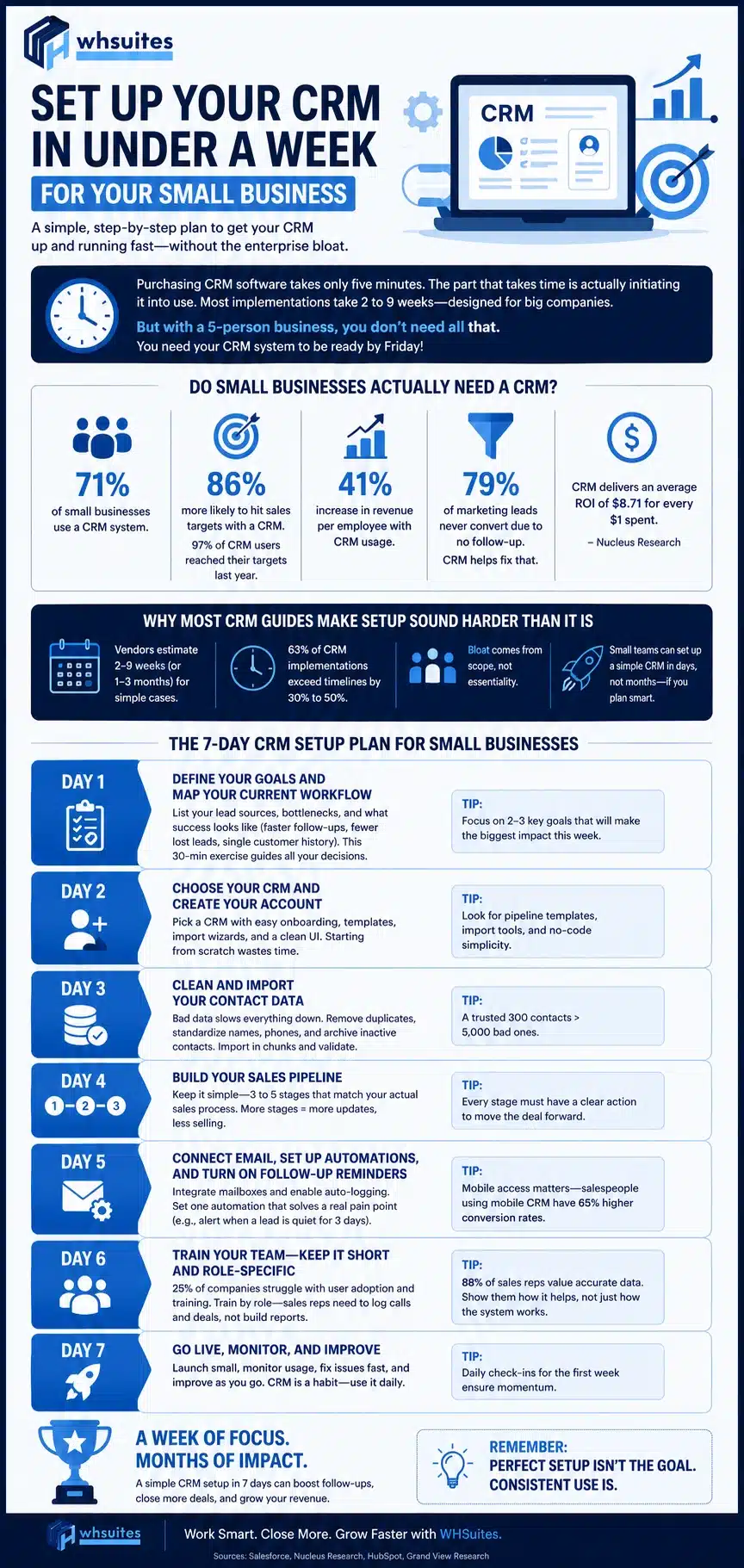
Purchasing CRM software takes only five minutes. The part that takes time is actually initiating it into use and this tends to be the part that small business owners avoid doing — despite the presence of guides in the market! In most cases, it can take two weeks to nine weeks for the CRM implementation process to be completed mainly because of the steering committees and 90-day review cycles which have been designed for big companies. If you have a five-person business, you really do not need all that. What you need is for your CRM system to be ready by Friday!
In this guide, the step-by-step process of CRM setup in a business is covered within a week – it includes setting up goals, migrating data, building a pipeline and finally going live; all without the bulk of the enterprise. All the statistics used here are from reliable sources.
Do Small Businesses Actually Need a CRM?
If you still use spreadsheets and a shared mailbox for your business operations, that does not mean you are late. In fact, it is high time already!
It has been observed that 71% of the small businesses are equipped with a CRM system. This implies that not having a CRM system should not be considered the norm but rather an exception.
Research has shown that companies using CRM systems are likely to reach their sales target by 86% more than those without a CRM system, and 97% of CRM users reached their targets last year.
Moreover, it has been shown by research that the usage of CRM systems is closely connected with a revenue increase per employee by as much as 41%.
Almost 79% of the companies that get marketing leads will fail to convert that lead into sales. This is the result of no follow-up, which can be solved by implementing the CRM system.
Why Most CRM Guides Make Setup Sound Harder Than It Is
The trend of presenting the implementation of the CRM as a complex process is visible in various CRM implementation timelines. For instance, if one vendor estimates the implementation duration from 2 to 9 weeks, others can provide a prediction from 1 to 3 months already for any simple case.
The situation is worsened by the 63% of CRM implementations that exceed their planned timelines by 30% or 50%.
The entire bloat occurs because of scope and not because of essentiality. A founder alone or teams made up of five people don’t have departments to take into account or integrations to be tested or a data migration involving multiple legacy systems. This is why a simple CRM solution can in fact be set up by small businesses in a few days as opposed to months if the timeline issue is caused by a lack of planning and not by software.
The 7-Day CRM Setup Plan for Small Businesses
Here’s how small businesses are supposed to set up a CRM in seven days, with each day of the plan focused on a certain task. Don’t skip days.
Day 1: Define Your Goals and Map Your Current Workflow
It is necessary to start the planning process on the first day not by changing settings in the software, but by drawing up a list of your sources of leads and their bottlenecks and determining what success looks like (getting back to customers quicker, losing fewer leads, having a single database with the entire history of customer interactions). This 30-min exercise determines all the rest of your decisions over the week.
Day 2: Choose Your CRM and Create Your Account
Select a solution that has a straightforward installation process and includes several templates for your use. This will be a determining factor in speeding up your implementation. If you have to start from scratch configuring all the fields and stages available in the CRM, you will waste most of the day doing that. Search for pipelining templates, import wizards, and user-friendly solutions that can be handled by any member of your team with no user manual.
Day 3: Clean and Import Your Contact Data
Faulty data is the main hindrance to fast implementation. One-fourth of organizations that use CRM point out that data entry is one of the biggest obstacles to the successful use of the system. Before importing the data, get rid of duplicates, standardize phone numbers and names of companies you are going to import, and archive all those inactive. Import in chunks and check to see if there are any mistakes in the imported data. The quality of contacts you import is very important; a CRM with 300 contacts that can be trusted is definitely better than a CRM with 5,000 contacts inputted with errors.
Day 4: Build Your Sales Pipeline
Limit the pipeline to only 3 to 5 stages that fit your company’s unique selling process instead of blindly following a generic template. Having six stages might sound exhaustive, but it just means your employees will be spending more time updating the stages instead of closing sales.
Day 5: Connect Email, Set Up Automations, and Turn On Follow-Up Reminders
Integrate your mailboxes and make sure automated activity logging is working properly so that you don’t have to enter anything manually — this simple step will determine whether your staff will be using this system after the second month. Set one automation that solves a real pain point, for example, getting a notification when a lead is quiet for 3 days. Making your system accessible over mobile is more important than it seems. Salespeople using mobile CRM have a conversion rate of 65% as opposed to only 22% of those with regular CRM.
Day 6: Train Your Team — Keep It Short and Role-Specific
Training is the stage where many 7-day timelines become 30-day timelines because 25% of companies admit that the adoption of the system and the training of the users are hard tasks for them.
Conduct a role-based training session for each of your teams. For example, sales representatives should get to know how to make calls and register deals, not how to build reports. All businesses place importance on the matter of accurate data – 88% of sales representatives want data to be accurate, and that is why the most important rule all of them should remember is to register calls and deals right after they do them.
Day 7: Go Live and Set Adoption Rules
From the very first day, you should have in place three basic rules: call registration, deal updating before the end of each working day, and prohibition of any spreadsheets. Make sure you choose a person on “champion” from each team so that he/she can answer the questions and help the team members.
Common Mistakes That Turn a One-Week Setup Into a Month-Long Struggle
There are many reasons why speedy CRM setups tend to fail but most are quite predictable and preventable. There are many specific reasons why CRM implementations fail and the commonest ones are limited planning and efforts in implementation, rather than the wrong choice of software.
- Despite the complexity of CRM features, some organizations try to enable them all in the first week instead of launching just the contacts and pipeline and setting up one automation.
- The second common issue is using dirty data for import without cleaning it first, which can increase your time for implementation by days.
- The third common reason is skipping CRM training just because the solution seems easy to use. But we all know that it still requires at least a 30-minute walkthrough.
- Another reason for not completing your CRM implementation successfully is that the system is not made mandatory for use. In other words, explicit requirements towards CRM use should have been established from day one to make everybody use the system.
- Finally, if managers ignore CRM and continue using spreadsheets, their subordinates will use them as well.
How to Know Your CRM Setup Actually Worked
The fact that your CRM has gone live does not signify that the task is finished it indicates that the actual test is about to begin. Check how the system is performing at 30, 60 and 90 days, asking yourself two questions: is the team entering activities without any reminders and are the deal stages accurate enough to be forecasted? If the answer is negative at the second check, it is a sign that the process needs to be simplified and not overloaded with new functionality.
The results of having done CRM correctly will be seen in numbers. Companies utilizing CRM report they’ve shortened their sales cycle from 8 to 14 days, while CRM has caused a decrease of 23% in lead costs.
Frequently Asked Questions
Can a small business really set up a CRM in a week?
For teams with an uncomplicated sales process and small contact databases, the answer is yes. The timeline will change when there is some cleaning to be done, multiple legacy systems to migrate from or large numbers of people to train. For a sole entrepreneur or a small business, it can really be done within a week if taken step-by-step and carefully.
What’s the biggest time-waster during CRM setup?
Imports of unclean data in advance and use of every possible function immediately after installation. Both actions increase the installation time from one week considerably.
Do I need technical skills to set up a CRM myself?
No, if you can select a CRM with guided implementation, ready-made templates and a simple wizard to import data. You do not need to hire a developer or an IT specialist.
How much contact data should I import in the first week?
Focus on clean, active contacts, not your entire backlog. A small, accurate set of data will help you more on Day 1 than a large set full of junk—you can always add to it later as things start moving.
How many pipeline stages should a small business use?
Generally, three to five are enough. If you can’t explain what needs to occur to move a deal from one stage to the next, you probably don’t need that stage.
How soon will I see results after setup?
Wait 30–90 days of real usage before evaluating outcomes. Your first indicators of progress include regular, daily usage and correct stage designation in the pipeline; results like reduced sales cycle will emerge over the following few months.
Final Thoughts
You can set up a functional CRM for your business without a 90-day plan. With a clear objective, good data, a basic sales process and a team that’s actually had a walk-through, “How to set up a CRM in less than a week for your small business” ceases to be an aspirational, yet perhaps out of reach goal and becomes your next normal Tuesday through Monday task. Just get started tomorrow morning.