

Lead Management Software for Mac
Are you running a Mac-based business? If so, WHSuites is the intelligent, cloud-based lead management system that works seamlessly with macOS. With WHSuites, you won’t have to deal with any software installations or compatibility problems. You will have a powerful sales engine that runs completely within your web browser. As either an emerging start-up company or a seasoned small-to-medium sized business (SMB), you can use WHSuites to collect every lead, automatically follow up on all leads, and close more sales — all while using your Mac!
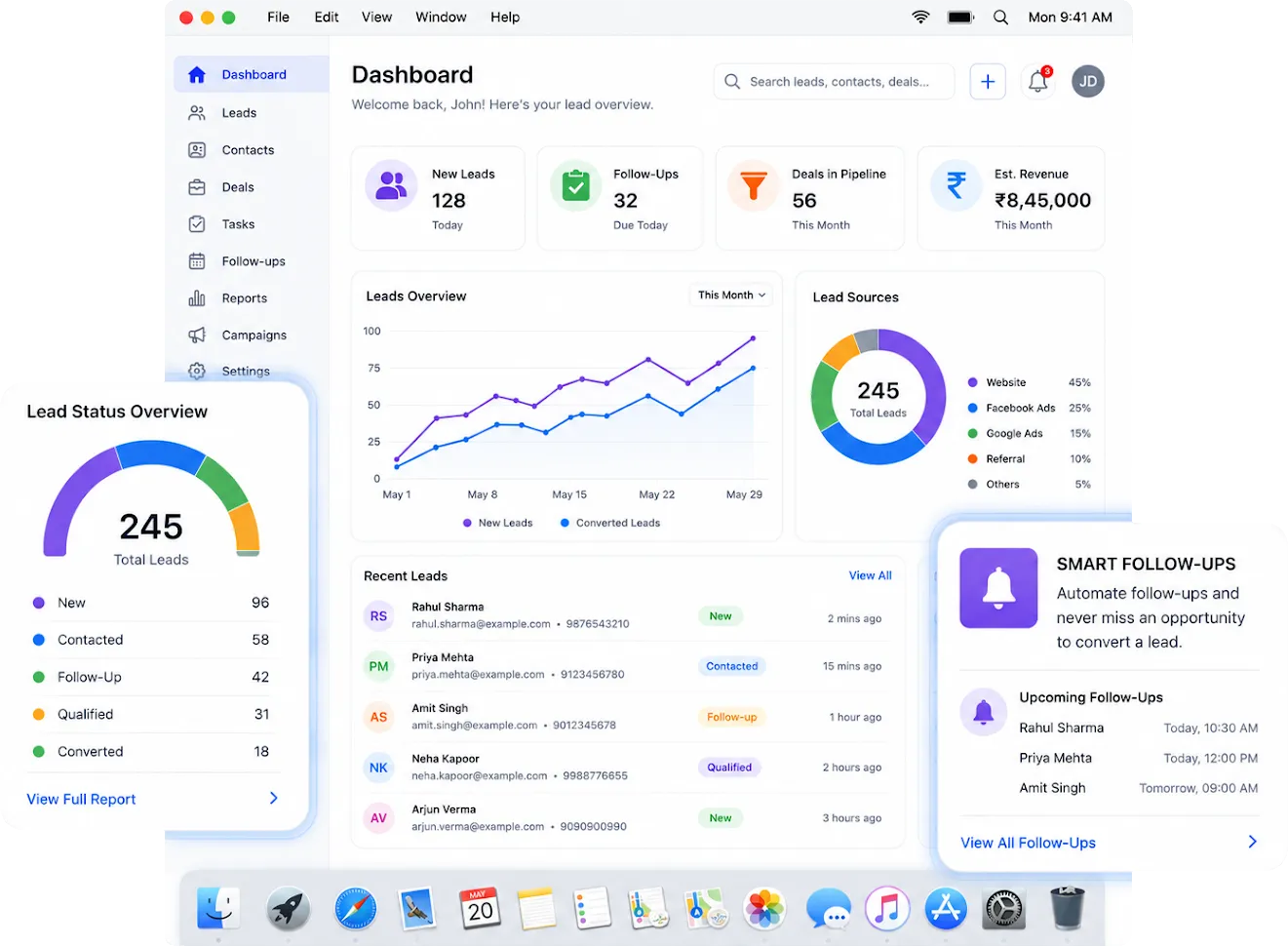
Understanding What Lead Management Software for Mac is:
Lead Management Software for Mac is a Cloud-based System that runs entirely in your Browser on any Mac device, including MacBook Airs, MacBook Pros, iMacs, and Mac Minis. You don’t need to install and maintain a Native App to run lead management software for Mac. Instead, your sales prospects are collected from several sources into one central location; all of your interactions with those sales prospects are tracked by WHSuites; the recurring follow-up tasks are automated using WHSuites, & your team can see the entire sales pipeline as it happens.
Unlike desktop-only applications, which have restrictions based upon which operating platform you’re using, WHSuites was designed to be completely Browser Native; meaning that you have all of the features of WHSuites, whether you are using Safari, Chrome, or Firefox on macOS. Your sales data will be in real-time across all of your devices.

Reasons That Mac Users Should Use A Dedicated Lead Management System:
There are many reasons why Mac users should have access to a dedicated lead management software solution. Generally speaking, Mac users are design-conscious, efficiency-driven professionals who appreciate clean, functional user interfaces that work seamlessly with their daily tasks as professionals. Unfortunately, many lead management and CRM platforms (Customer Relationship Management) are developed with a Windows-first philosophy and lack many of the features and capabilities enjoyed by Mac users. WHSuites was developed to help fill this gap by delivering a highly responsive, fluid, and user-friendly interface that is appropriate for use in macOS environments:
- There is no installation hassle — simply open any web browser on a Mac and WHSuites will be instantly accessible.
- Retina-display-ready UI — Dashboard views are uncluttered and beautifully rendered so they look great on any Mac screen.
- Works offline through web browser caching — you can continue to work on WHSuites regardless of whether or not you have an internet connection.
- Feature parity across platforms — 100% of WHSuites features are available on Mac, Windows, iOS and Android devices.
- Keyboard-shortcut functionality — users will be able to use keyboard shortcuts to navigate the application as quickly as work allows.
Key features of WHSuites Lead Management System for Mac
Smart Multi-source lead capture
WHSuites can pull leads from multiple sources such as your web site forms, IndiaMart, PharmaHopers, Facebook Ads, WhatsApp, and more, automatically creating a centralized dashboard of leads that have been captured by your Mac.
Intelligent Lead Auto-assignment
Once new leads are captured by WHSuites, they will be automatically assigned to the appropriate sales associate using pre-defined assignment rules such as territory, product line, etc. WHSuites provides tools such as drop down lists that allow sales associates to quickly search for products they are interested in selling.
Visual Pipeline Management
Use a real-time drag-and-drop representation of your whole sales cycle. Move prospects through the stages of your funnel, assign value to their deal, add notes, and track probability of closing a deal, from your Mac browser — all in seconds!
Automated Follow-ups & Reminders
Don't ever let a hot lead turn cold! WHSuites sends out automated follow-up emails, sms messages, and WhatsApp reminders triggered by events you set up so you can continue reaching out to leads when your team is busy.
Interaction History and 360° Customer View
Every event you participate in with a lead (call, email, meeting, note) is captured on the lead record and stored for you to easily access before your next meeting. You are guaranteed to walk into any meeting with a lead completely informed.
Advanced Reporting and Analytics
All metrics including lead velocity, conversion rates, team activity metrics, campaign return on investment can be tracked from WHSuites built-in analytics. You can export reports directly from your Mac and send them in seconds.
Customizable Workflows & Fields
Each company is unique so WHSuites allows you to modify every part of your sales process, such as creating your own stages, data fields, lead status, and automation triggers to fit your exact needs.
Secure Cloud Storage
Your data is safe and secure using enterprise-level encryption and role-based access controls. You can choose exactly who in your team (Mac users) can access or modify your data.
WHSuites Solves Lead Management Problems:
Find How WHSuites Can Solve Most Lead Management Problems and Issues While Using macOS
| Lead Management Problems While Using macOS | How WHSuites Solves It |
|---|---|
| Missing Leads | Automatically captures leads and instantly assigns them for faster follow-ups. |
| Poor Lead Follow-Up | Automated workflows ensure timely and personalized follow-up communication. |
| Lack of Sales Pipeline Visibility | Real-time sales pipelines help managers monitor deals and opportunities easily. |
| Manual Lead Assignment Delays | Smart auto-assignment distributes leads to the right representatives instantly. |
| Duplicate Lead Entries | Advanced duplicate detection keeps customer data clean and organized. |
| Difficulty Managing Multiple Lead Sources | Centralizes website, WhatsApp, forms, and campaign leads into one dashboard. |
| Missed Follow-Up Reminders | Automated reminders ensure no important activity or meeting gets missed. |
| Limited Team Collaboration | Shared dashboards improve communication and team coordination. |
| Lack of Real-Time Notifications | Instant alerts notify teams whenever a new lead or activity appears. |
| Difficulty Tracking Sales Performance | Built-in analytics provide insights into conversions and team performance. |
Who Is the Ideal User of WHSuites Lead Management Software for Mac?
WHSuites is a more cost-effective option for SMBs to have access to enterprise-level functionality at a fraction of the cost of an enterprise product.
WHSuites can help you pull lead information into one location from various external sources. By integrating with the following tools whilst running on your Mac, you will save time on importing and generating leads.
WHSuites was designed specifically for companies that are focused on growth and can operate from any type of computer system. We work with several types of businesses including:
- Pharmaceutical field representatives and doctor leads using Mac to track leads
- Solar energy installation leads and follow ups
- Real estate agents tracking property inquiry leads
- IT companies and SaaS vendors handling B2B inbound leads
- Insurance agents who need compliance with lead management processes
- Educational institutions managing their student inquiry systems
- Small and medium businesses want cost-effective and easily configurable CRM system.

Manage All Your Leads From One Platform
Capture, track, and convert leads from every channel — all in one powerful lead management software, built for Mac.









Commonly Asked Questions About WHSuites Lead Management On A Mac
Is there a need to install any software on my Mac in order to use WHSuites?
No, WHSuites is a completely web-based application, which you access from any browser available on your Mac or Apple device. You simply need to use Safari, Chrome, or any other modern browser to access WHSuites by logging into it and being able to manage leads – no downloads, plug-ins, or compatibility patches necessary.
WHSuites supports what versions of the macOS operating system?
WHSuites supports any version of macOS that runs with a currently-supported web browser. This includes both the current macOS versions (Ventura, Sonoma, etc.) and older versions as long as they have a modern web browser that is up to date in terms of functionality. As a result, WHSuites should operate successfully on all macOS versions that have a supported web browser.
Will I be able to use WHSuites on my iPad/iPhone at the same time as my Mac?
Yes, you may use WHSuites on all your devices and they will all sync together in real-time. Therefore, you will have access to all your data regardless of which device you are using at any given time.
Is my data safe when using WHSuites on a Mac?
Yes, WHSuites stores all its data using secure cloud-based servers with strict end-to-end encryption and role-based access controls. You will have complete control over determining who has access to your company’s data (prospects), and you can restrict all access to only those users who need it in order to keep your prospect’s data secure.
Does WHSuites support import of leads from Indian B2B platforms, such as IndiaMart?
Yes, one of WHSuites’ features is connecting with both IndiaMart and PharmaHopers to automatically pull in new leads from those platforms, thus eliminating manual entry altogether.
How quickly can I start using WHSuites on my Mac?
You can use WHSuites almost immediately. After signing up for a free demo and having your account set up, you can start collecting leads on the same day. There is no need for a long onboarding process or IT support.
How does WHSuites help me to reduce the time it takes to respond to leads on my Mac?
Yes, WHSuites was built for teams to work together. Multiple sales reps, managers and administrators can log in to their own Mac at the same time and all be connected to the same dashboard. WHSuites offers multiple user access based on the user’s role, so that everyone can see only the information that is needed to do their job. WHSuites is truly a multiple-user CRM software solution for any size sales team.
Will WHSuites have reports and analytics available for Mac users?
Yes, WHSuites has advanced reporting and analytics capabilities that allow you to track lead source and conversion rate by team performance, sales velocity, and the return on investment for campaigns. Reports are real-time and accessible directly from your Mac forward or backward — they can also be exported in order to share with stakeholders. This makes WHSuites an effective analytical tool to drive revenue growth through actionable data for Mac users.
Is WHSuites an alternative CRM for Mac users to other CRMs?
Yes, particularly for small and medium-sized businesses. WHSuites offers comparable lead management, pipeline tracking, and automation features at a much lower price, with a simpler user experience and with dedicated onboarding. Additionally, in the case of Indian businesses, WHSuites also integrates seamlessly into both IndiaMart and PharmaHopers, thus making it a better solution for local market needs.
Does WHSuites allow me to track where my leads are coming from so that I can see which are my best leads?
Yes, WHSuites provides a way for you to track the source of each lead by tagging them at the time of entry. This means they will be automatically tagged the moment they enter the system (regardless of whether they came via a website form, IndiaMart, Facebook Ads, WhatsApp, or manual input) with what source created them in the system. With this capability, the sales managers using Mac systems will be able to easily identify the channels that generate the most qualified prospects and apply the marketing budget accordingly to get the most ROI.