
If your team is still using a spreadsheet to follow up leads, you are far from alone. About one quarter of small and medium sized organizations continue using spreadsheets or Excel for customer management purposes, which means the practice persists even after it stops being effective.
It works fine with the limited number of customers being handled by one person. But small businesses often reach a point when the spreadsheet starts to cost them customers, hours, and mental health before anybody recognizes it as such. Below are the 7 signs that your company needs a CRM, each supported by convincing evidence.
1. You’re Losing Leads and Can’t Trace Where They Went
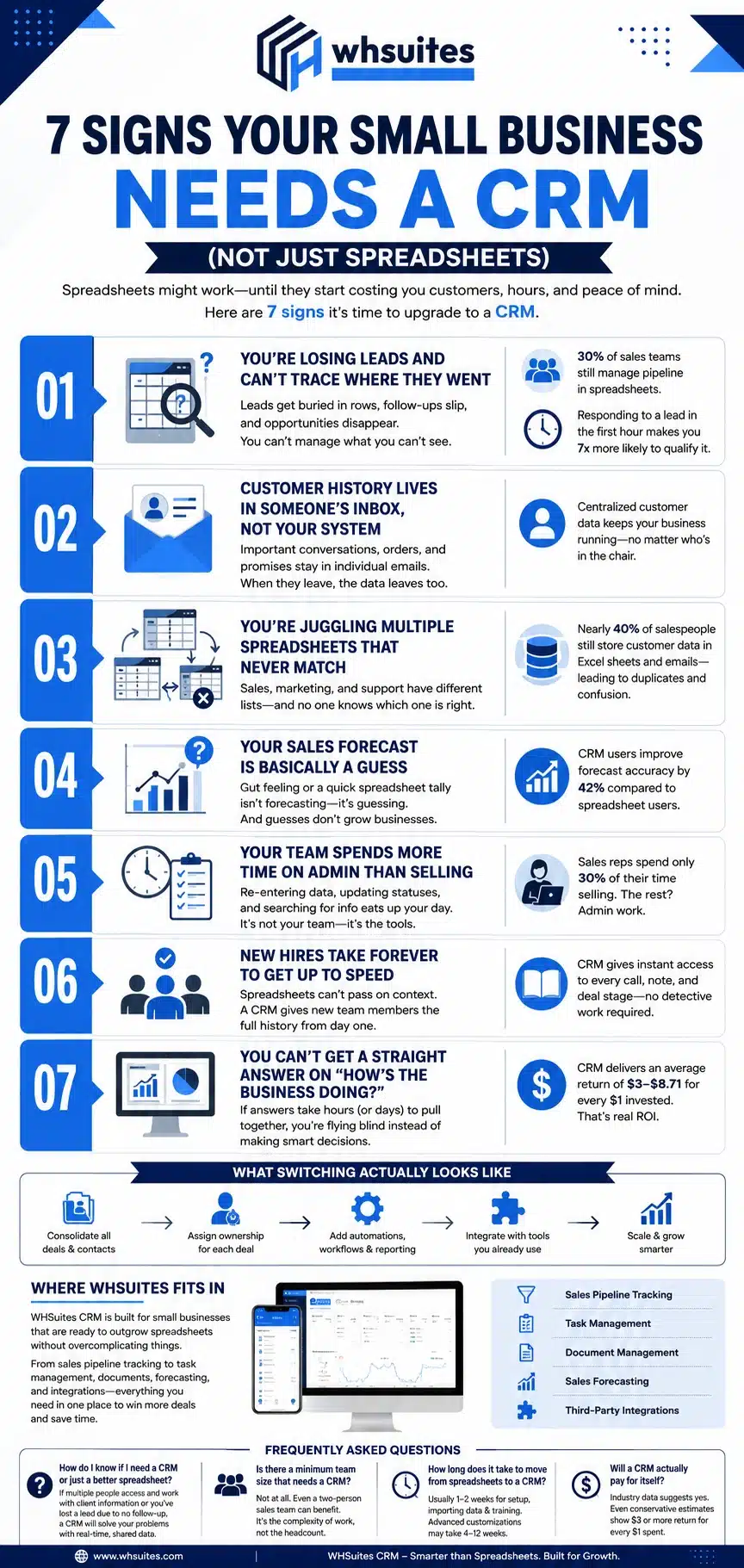
A lead comes in, someone sends the first email, and after that, it vanishes among the rows. What happened? Did it die out on its own? Could it have died out somewhere and no one bothered to update the spreadsheet? If you cannot answer this question in less than a minute, your sales pipeline is definitely a black box. This is one of the most obvious 7 signs that your business needs a CRM instead of a spreadsheet: about 30% of sales teams are still managing their pipeline primarily using spreadsheets, while companies utilizing CRM report higher visibility into the status of their deals.
The problem does not get better once you take into account time. Studies by Harvard Business Review showed that responding to a lead within the first hour increases its chances of being qualified by seven times, which is an impossible standard to keep in any shared file that does not have any notification or automation for tracking leads.
2. Customer History Lives in Someone’s Inbox, Not Your System
When a client contacts, your staff ought to be capable of generating all the previous orders, complaints and commitments in a matter of ten seconds; if the actual response is “let me ask Priya”, it means that the data resides in individual email account rather than on a usual customer relations management system. When this person falls sick or leaves a job, all of the previous information is going with him/her.
3. You’re Juggling Multiple Spreadsheets That Never Match
Sales representatives keep one contact list, marketing experts – another one, and support representatives – the third one. All lists contain slightly different data about the same client and no one knows which one is correct. This is not an issue of discipline but rather of the fact that spreadsheets were asked to perform a function of databases. Almost 40% of sales people continue storing client information in their Excel sheets and emails instead of using a single record-keeping database which leads to nonsensical duplication of data.
4. Your Sales Forecast Is Basically a Guess
Your Sales Forecast Is purely a guess. Your estimate for the quarter is that it’ll be about ₹15 lakh, but you give little explanation of how you arrived at that figure. Perhaps your guess is based either on instinct or on a quick tally of your open transactions in a tab on a spreadsheet? Companies that effectively manage their sales pipeline using a CRM see their forecasting performance improve by 42% when compared to their use of spreadsheets. This is primarily due to the fact that they have access to information on the status, value and likelihood of each deal all in one location, as opposed to relying on everyone’s imperfect memory.
5. Your Team Spends More Time on Admin Than Selling
Your team is more focused on administering than selling, as it has been shown that sales representatives spend a mere 30% of their time selling. The remaining hours involve administrative tasks such as data entry and searching for information using unconnected tools. If your team is involved in re-typing contact details and making an effort to update the status of different transactions each week, that just proves the efficiency of the existing tools at your disposal, rather than your team’s capabilities.
6. New Hires Take Forever to Get Up to Speed
Staffing a new salesperson on the basis of the spreadsheet involves giving them a static file and praying that years of knowledge have been communicated verbally. A small business CRM keeps each call, note and deal phase attached to the client’s information. Therefore, the new employee can view all client activities instead of taking months gathering that knowledge.
7. You Can’t Get a Straight Answer on “How’s the Business Doing?”
Whenever the information required is revenue by client, active deals, or the clients that have not been contacted for three months, if the truthful answer is “give me till tomorrow, I have to find it in three files”, the procrastination is mere coincidence. Centralizing the information pays off as Nucleus Research has calculated the average yield from CRM is as high as $8.71 for each investment dollar historically and the modern estimates center more around $3-$5 for any investment dollar spent. Either estimating puts the spreadsheet vs. CRM in a very good light if only hours saved and deals not lost are counted.
What Switching Actually Looks Like
Switching from spreadsheets does not always entail complicated and abrupt migration processes. Those firms that achieve successful outcomes usually follow a straightforward approach by first consolidating all deals and contacts into one database, designating responsible individuals for each deal and then proceeding with such elements as automations, reporting, and integrations introduced afterward. This pattern reflects the general trend of using CRM: there are now about 91% of companies with ten and more employees that use CRM software.
Where WHSuites Fits In
WHSuites CRM is developed specially to cater to this type of client: small businesses that have outgrown the use of spreadsheets but do not require complicated enterprise solutions. WHSuites combines various features such as task management, tracking of sales pipelines, document management, sales forecast and third-party integrations in one system thus, companies no longer need to worry about losing leads or making miscalculations on sales forecasts.
Frequently Asked Questions About Your Small Business Needs a CRM
How do I know if I need a CRM or just a better spreadsheet?
If there are several employees who access and work with clients’ information or you’ve ever lost a potential client because you forgot to follow up with him/her, a CRM can solve your issues because it provides you with shared access to data in real time.
Is there a minimum team size that needs a CRM?
Not even close because even if only two people work in your sales division, they may find it useful to have a CRM in their work. It is the complexity of tasks that triggers the use of CRM, not the number of employees.
How long does it take to move from spreadsheets to a CRM?
Typically, it won’t take more than 1-2 weeks to set it up, import clients’ information, and train the team. However, if you want to customize it a lot and incorporate automation, it may take you 4 to 12 weeks.
Will a CRM actually pay for itself?
Industry data suggests yes. Even conservative modern estimates put CRM returns at $3 or more for every $1 spent with well adopted systems performing significantly higher.