Struggling to assign tasks, define responsibilities, or team availability at the right time? Don’t worry. Scheduling & staff assignment made easy with CRM software. We know managing all the tasks, responsibilities & client data through spreadsheets can be complex & challenging. But a well-organized CRM helps you keep all the data in one centralized place.
Now, CRM has the most beneficial feature: you can easily assign tasks, check status and manage the whole team in one place. It also allows businesses to decide who should handle the next assignment without overlapping responsibilities.
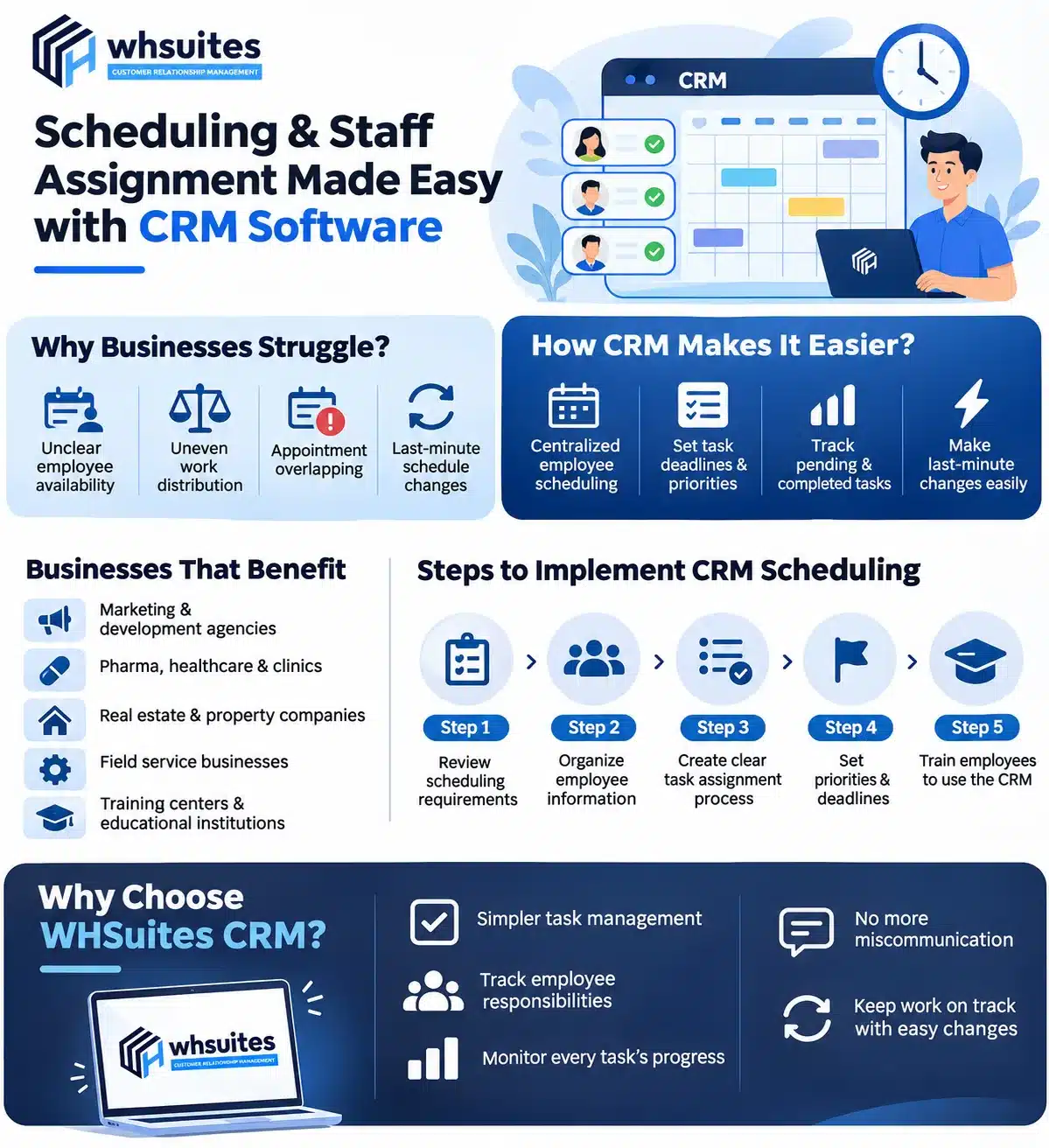
Reasons Businesses Struggle With Employee Scheduling & Staff Assignment
Without any centralized platform, most businesses struggle with employee scheduling & staff assignment. But does anyone know why? Let’s see:
Unclear Information on Employee Availability: Businesses mostly manage employee schedules on different files or communication through messages. With this, managers struggle to know who is available for assignment.
Zero Equality in Work Distribution: We see some employees handle most of the responsibilities while others comparatively have less work. This kind of struggle comes when managers assign tasks manually.
Appointments & Meeting Overlapping: If any business deals with regular client meetings, service appointments or project discussions. They require time management. No centralized system can lead to two same time appointments to the same person.
Schedule Changed Last Minute: Sometimes employees leave early, urgent client meetings happen, or project delays occur. This destroys the whole schedule. For this, the manager has to contact employees individually, manage multiple things that can increase the possibility of miscommunication.
How CRM (Customer Relationship Management) Software Makes Scheduling & Staff Assignment Easier?
CRM is not just another software; it is specially designed to make business work management smarter. Let’s see how CRM software makes scheduling & staff assignment easier:
Employee Scheduling Centralized
The biggest advantage of CRM is that it helps schedule all employees’ work. Now, managers can easily use the scheduling & calendar feature. With this, they can organize appointments, meetings, tasks & other work-related activities. CRM has a centralized scheduling system that is used to organize responsibilities as per employee availability.
Set Task Deadlines & Priorities
Some assignments require instant action, while some can be delayed. With the help of a well-organized CRM, you can easily organize tasks with details such as status, project name, priority mark, start date, due date, and many more details.
Keep Pending & Completed Tasks
Just assigning tasks is not the job. Managers need to check whether an employee is working on a project, how much of the project is completed or if the employee is available or not. For this, CRM has a review task feature. With that, the manager can easily review all the tasks and check every process of the employee.
Make Last-Minute Changes Without Confusion
Business plans often change multiple times, like urgent meetings, unexpected leave or something else. CRM features allow managers to make last-minute changes in task, deadline or keep workflow well organized every time.
Businesses that Can Benefit from CRM Scheduling & Staff Assignment
Scheduling & staff assignment through CRM is most useful for the following businesses:
Online marketing & development agencies
Pharma, Healthcare & clinics
Real estate & property companies
Services related to the field
Training centers & educational institutions
Look at Steps to Implement CRM-Based Scheduling in Your Business
Step 1: Review Your Scheduling Requirements
Always first identify what your business needs to schedule. It can be employee shifts, client appointments & field service visits.
Step 2: Organize Employee Information
Once check the scheduling requirements. Now maintain updated employee details, departments, working hours or relevant skills.
Step 3: Create Clear Task Assignment Process
Identify how tasks will be assigned and who will be responsible for this.
Step 4: Set Priorities & Deadlines
Once the task assignment process is created. Make sure employees understand which tasks need immediate attention and which require less. For this, you have to set priorities & deadlines.
Step 5: Train Employees to Use the CRM
Once you set up the task management system, you need to tell your employees how to use the CRM, check tasks, view responsibilities and update task statuses.
What Makes WHSuites CRM the Best for Scheduling & Staff Assignment?
WHSuites CRM is specially designed to help manage all-day activities without depending on any spreadsheets. Whether you are a small team or a large one, our CRM makes it easier to assign responsibilities and keep everyone informed.
Some exclusive features of WHSuites CRM:
The easiest task management that reduces confusion
Allows you to keep track of all employee responsibilities and ongoing assignments
Keep an eye on every task’s progress
Removes miscommunication or unnecessary follow-ups
Keep an eye on important work and make necessary changes
Questions Asked by Business about Scheduling & Staff Assignment Made Easy With CRM
How can we know which employee is available through CRM?
In CRM software, you get a feature name assigned to and also with that, you get filter options with which you can filter out those employees who have not any scheduled task.
I usually manage multiple client meetings daily; how can CRM help me?
Managing multiple clients is easy, but scheduling all the meetings on time can become challenging. This is where CRM helps you. With that, you can easily schedule every meeting on time.
I am running a small company. How can I assign daily tasks to my team?
Just open a CRM, add tasks, specific employee names, mention their responsibilities, set deadlines and define priorities.
Can employees also view their daily schedules in CRM?
Yes, with the help of a CRM, you can easily access your assigned tasks, upcoming activities, deadlines and work updates.
I am currently using Excel for team management; should I switch to CRM?
No doubt, Excel works well for maintaining basic employee records. But when it comes to managing complete business operations, Excel often fails. That’s where you must switch to CRM.
My team sometimes forgets deadlines; can CRM really help remind them?
Yes. CRM Software has a reminder feature that helps your team stay informed about deadlines.